Labels

Sunday, January 15, 2012

How to Create Dropdown Menu

What is dropdown menu?
Dropdown menu is like this :


Here is the trick how to create dropdown menu :

Copy the code below and put it on your page elements.


<select onChange="document.location.href=this.options[this.selectedIndex].value;">
<option value="0" selected>Blog Archive</option>
<option value="Links 1">Text 1</option>
<option value="Links 2">Text 2</option>
</select>

The red text is links, change it with your links.
The blue text is Anchor text. Yau must change it.

For example :


<select onChange="document.location.href=this.options[this.selectedIndex].value;">
<option value="0" selected>Blog Archive</option>
<option value="http://trick-blog.blogspot.com/2008/02/tutorial-to-create-dtree-menu.htmll"> How to Create Dtree Menul </option>
<option value="http://trick-blog.blogspot.com/2008/01/how-to-create-search-engine-in-blogger.html"> How to Create Search Engine </option>
</select>

The result would be like this:


To add more menu/item, put a code like below

<option value="Links 3">Text 3</option>

before this code </select>

If you want the links opened in new window, change the code below

<select onChange="document.location.href=this.options[this.selectedIndex].value;">

with this code ::

<select onchange="javascript:window.open(this.options[this.selectedIndex].value);">

The resul would be like this:


Source : http://trick-blog.blogspot.com/

Friday, January 13, 2012

Create Vertical Menu

We have learned how to create horizontal menu before. Now we will try to make a vertical menu. We will make a vertical menu like the image. Ok let's do it
.glossymenu, .glossymenu li ul{
list-style-type: none;
margin: 0;
padding: 0;
width: 185px; /*WIDTH OF MAIN MENU ITEMS*/
border: 1px solid black;
}
.glossymenu li{
position: relative;
}
.glossymenu li a{
background: white url('http://blog.superinhost.com/vertical/blue1.gif') repeat-x bottom left;
font: bold 12px Verdana, Helvetica, sans-serif;
color: white;
display: block;
width: auto;
padding: 5px 0;
padding-left: 10px;
text-decoration: none;
}
.glossymenu li ul{
position: absolute;
width: 190px;
left: 0;
top: 0;
display: none;
}
.glossymenu li ul li{
float: left;
}
.glossymenu li ul a{
width: 180px;
}
.glossymenu li a:visited, .glossymenu li a:active{
color: white;
}
.glossymenu li a:hover{
background-image: url('http://blog.superinhost.com/vertical/blue2.gif');
}

* html .glossymenu li { float: left; height: 1%; }
* html .glossymenu li a { height: 1%; }


You can change the menu color, look at the red text (blue1.gif and blue2.gif). Change it with some color menu below. For example, if you want to choose red color, then the code would be like this :
.glossymenu li a{
background: white url('http://blog.superinhost.com/vertical/red.gif') repeat-x bottom left;

dan
.glossymenu li a:hover{
background-image: url('http://blog.superinhost.com/vertical/red.gif');


Vertical Menu Color :

blue1.gif
blue2.gif
green1.gif
green2.gif
red1.gif
red2.gif
pink1.gif
pink2.gif
black1.gif
black2.gif


3. Save your template.
4. Then go to "Page Elements" menu
5. choose "Add a Gadget -->HTML/JavaScript" the insert the code below.

<ul id="verticalmenu" class="glossymenu">
<li><a href="/">Home</a></li>
<li><a href="http://trik-tips.blogspot.com">Trik Blog</a></li>
<li><a href="http://x-template.blogspot.com" >Free Template</a></li>
<li><a href="http://getebook.co.cc">Free Ebook</a></li>
</li>
</ul>


Note :
- The red code is the links.
- The Blue code is anchor text.
- If you want to add menu, just copy the blink code and paste it.

6. Then click "Save"

Source : http://trick-blog.blogspot.com/

Create Tab View

Tab View is very usefull box. We can fill it with many contain. It will save our blogs area. (See Image Below)

div.TabView div.Tabs
{
height: 24px;
overflow: hidden;
}
div.TabView div.Tabs a
{
float: left;
display: block;
width: 90px; /* Width top main menu */
text-align: center;
height: 24px; /* Height top main menu */
padding-top: 3px;
vertical-align: middle;
border: 1px solid #000;
border-bottom-width: 0;
text-decoration: none;
font-family: "Times New Roman", Serif; /* Top main menu font */
font-weight: 900;
color: #000; /* Top main menu font color */
}
div.TabView div.Tabs a:hover, div.TabView div.Tabs a.Active
{
background-color: #FF9900; /* Top main menu background color */
}
div.TabView div.Pages
{
clear: both;
border: 1px solid #6E6E6E; /* Content Border color */
overflow: hidden;
background-color: #FF9900; /* Content background color */
}
div.TabView div.Pages div.Page
{
height: 100%;
padding: 0px;
overflow: hidden;
}
div.TabView div.Pages div.Page div.Pad
{
padding: 3px 5px;
}


4. You can change the code according to the red text explanation. To get html color code see HERE
5. The next step is put the code below before </head>

<script src='http://superinhost.com/trikblog/tabview.js' type='text/javascript'/>


6. Then "save" it.
7. Go to "Page Elements" menu
8. Chose "Add Page Element" --> "HTML/Javascript" in place where you want to put this tab.
9. Insert this code :
<form action="tabview.html" method="get">
<div class="TabView" id="TabView">
<div class="Tabs" style="width: 350px;">
<a>Tab 1</a>
<a>Tab 2</a>
<a>Tab 3</a>

</div>
<div class="Pages" style="width: 350px; height: 250px;">

<div class="Page">
<div class="Pad">
Tab 1.1 <br />
Tab 1.2 <br />
Tab 1.3 <br />

</div>
</div>

<div class="Page">
<div class="Pad">
Tab 2.1 <br />
Tab 2.2 <br />
Tab 2.3 <br />

</div>
</div>

<div class="Page">
<div class="Pad">
Tab 3.1 <br />
Tab 3.2 <br />
Tab 3.3 <br />

</div>
</div>

</div>
</div>
</form>

<script type="text/javascript">
tabview_initialize('TabView');
</script>


Note :
- The number or the blue text(350px) Is size of the tabview.
- The green code is the main menu text
- The red code is the content of tabview. you can fill it with links, banner, widget, comment or anything.
- To add more menu, see on the blink code. Add the code under it.

Good luck every body.


Source : http://trick-blog.blogspot.com/

Thursday, January 12, 2012

Download Free Internet Download Manager 5.18.2 Full Version, Serial Keygen, Crack


Internet Download Manager has a smart download logic accelerator that features intelligent dynamic file segmentation and safe multipart downloading technology to accelerate your downloads. Unlike other download accelerators and managers that segment files before downloading starts, Internet Download Manager segments downloaded files dynamically during download process. 

Internet Download Manager reuses available connections without additional connect and login stages to achieve better acceleration performance. Internet Download Manager supports proxy servers, ftp and http protocols, firewalls, redirects, cookies, authorization, MP3 audio and MPEG video content processing. IDM integrates seamlessly into Microsoft Internet Explorer, Netscape, MSN Explorer, AOL, Opera, Mozilla, Mozilla Firefox, Mozilla Firebird, Avant Browser, MyIE2, and all other popular browsers to automatically handle your downloads. You can also drag and drop files, or use Internet Download Manager from command line. Internet Download Manager can dial your modem at the set time, download the files you want, then hang up or even shut down your computer when it's done.

Other features include multilingual support, zip preview, download categories, scheduler pro, sounds on different events, HTTPS support, queue processor, html help and tutorial, enhanced virus protection on download completion, progressive downloading with quotas (useful for connections that use some kind of fair access policy or FAP like Direcway, Direct PC, Hughes, etc.), built-in download accelerator, and many others. 


Features:
  All popular browsers and applications are supported! Internet Download Manager has been tested with the following browsers: Internet Explorer, MSN Explorer, AOL, Netscape Communicator, Netscape 6, Netscape 7, Mozilla, Mozilla Firefox, Mozilla Firebird, Opera, NetCaptor, UltraBrowser, Slim Browser, Avant Browser, MyIE2, Optimal Desktop, Ace Explorer, Advanced Browser, 27 Tools-in-1 Wichio Browser, WindowSurfer, 550 Access Browser, FineBrowser Freeware, Kopassa Browser, Fast Browser Pro, Enigma Browser, GoSuRF, K-Meleon, Smart Explorer, The Off By One Web Browser, Smartalec Voyager, CrystalPort AppCapture, The Family Browser, XANA Web Browser, Bluto, AutoSurf, 32bit Web Browser, BrowseMan, WrestlingBrowser, Eminem Browser, UltraBrowser, Cygsoft LDAP Browser, and Net M@nager. Internet Download Manager supports all versions of popular browsers, and can be integrated into any 3rd party Internet applications.

Easy downloading with one click. When you click on a download link in a browser, IDM will take over the download and accelerate it. IDM supports HTTP, FTP, HTTPS and MMS protocols.

Download Speed Acceleration. Internet Download Manager can accelerate downloads by up to 5 times due to its intelligent dynamic file segmentation technology. Unlike other download managers and accelerators Internet Download Manager segments downloaded files dynamically during download process and reuses available connections without additional connect and login stages to achieve best acceleration performance.

Download Resume. Internet Download Manager will resume unfinished download from the place where they left off.
YouTube grabber. Internet Download Manager can grab FLV videos from popular sites like YouTube, MySpaceTV, and Google Video.

Simple installation wizard. Quick and easy installation program will make necessary settings for you, and check your connection at the end to ensure trouble free installation of Internet Download Manager

Drag and Drop. You may simply drag and drop links to IDM, and drag and drop downloaded files out of Internet Download Manager.

Automatic Antivirus checking. Antivirus checking makes your downloads free from viruses and trojans.

Advanced Browser Integration. When enabled, the feature can be used to catch any download from any application. None of download managers have this feature.
Built-in Scheduler. Internet Download Manager can connect to the Internet at a set time, download the files you want, disconnect, or shut down your computer when it's done.

IDM includes web site spider and grabber. IDM downloads all required files that are specified with filters from web sites, for example all pictures from a web site, or subsets of web sites, or complete web sites for offline browsing. It's possible to schedule multiple grabber projects to run them once at a specified time, stop them at a specified time, or run periodically to synchronize changes.

IDM supports many types of proxy servers. For example, IDM works with Microsoft ISA, and FTP proxy servers.
IDM supports main authentication protocols: Basic, Negotiate, NTLM, and Keberos. Thus IDM can access many Internet and proxy servers using login name and password.

Download All feature. IDM can add all downloads linked to the current page. It's easy to download multiple files with this feature.

Customizable Interface. You may choose the order, and what buttons and columns appear on the main IDM window.
Download Categories. Internet Download Manager can be used to organize downloads automatically using defined download categories.

Quick Update Feature. Quick update may check for new versions of IDM and update IDM once per week.
Download limits. Progressive downloading with quotas feature. The feature is useful for connections that use some kind of fair access policy (or FAP) like Direcway, Direct PC, Hughes, etc.

IDM is multilingual. IDM is translated to Albanian, Arabic, Azerbaijan, Bosnian, Bulgarian, Chinese, Croatian, Czech, Danish, Dutch, Farsi, French, German, Greek, Hebrew, Hungarian, Italian, Japanese, Korean, Lithuanian, Macedonian, Norwegian, Polish, Portuguese, Romanian, Russian, Serbian, Slovak, Slovenian, Spanish, Thai, Turkish, and Uzbek languages. 


Source : http://learnhackz.blogspot.com/

Tuesday, January 10, 2012

The trick to save memory capacity on Google Chrome

Google Chrome regularly release new updates to fix security issues and stability. But every time you update the version of Google Chrome long been the latest version of the file system from the old version will not be erased, so it will only increase the memory capacity on your hard disk and can make your computer work more slowly. ShaneGowland has created a simple tool but potent to delete old files in Google Chrome which is no longer needed automatically. Tool is given the name Old Chrome Remover Tool . How to use it is very easy.
  1. Download Old Chrome Remover Tool .
  2. Run the Chrome Remover Old Tool. This tool can work if your computer has installed the Microsoft. NET Framework 3.5 .
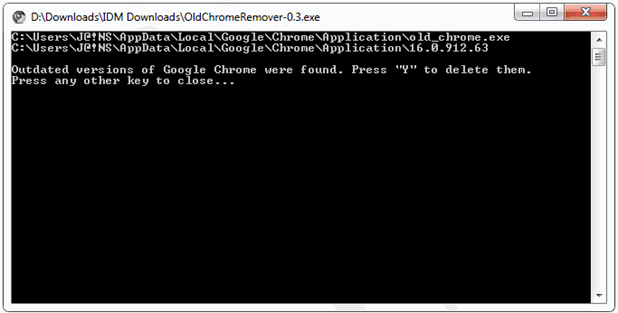
  3. Once the Command prompt window appears as below, will be read if you installed Google Chrome have an older version.
  4. The trick to save memory capacity on Google Chrome
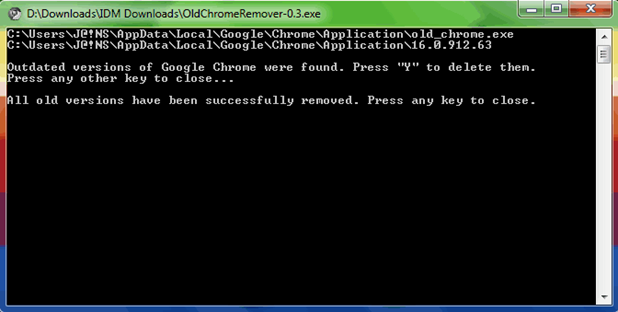
  5. Press " Y "to delete the old version of Google Chrome. When finished press any key to close the window.
  6. The trick to save memory capacity on Google Chrome
  7. Google Chrome now that you put there is no more the old version left on your hard disk. And it will do little to reduce the burden of memory.

Source : http://blogbiztutor.blogspot.com

Monday, January 9, 2012

Download Google Chrome Offline Installer 16.0.912.75 Stable

Stable Google Chrome Offline Installer 16.0.912.75 is the latest version that you can install it offline (without connection Internet .) Google Chrome 16.0.912.75 designed to be open a website faster, stable and secure. With a minimalist and efficient display will certainly facilitate the user in doing surfing in cyberspace. Google Chrome has developed quite rapidly and increasingly popular among Internet users. Today, almost every 6 weeks Google released a version  of Chrome . Google Chrome 16.0.912.75 Stable is also a refinement of previous versions .

Google Chrome 16.0.912.75 Stable offers stability and a high level of security. In it there is a built-in applications such as PDF Reader and Flash Player that is automatically updated each release the latest version and works in sandbox mode (isolated) to maintain the safety and security. Google Chrome 16.0.912.75 Stable is also integrated with Google Translate , which is can automatically translate a web page.

The new features offered by Google Chrome 16.0.912.75 Stable is a multi Gmail accounts . In the browser makes it possible to be able to have more than one account Google and can easily switch from one account to another account without having to do things that interfere with such sign in or sign out. You simply press the button on the upper left corner, it will automatically be transferred into your Google account to another. However, this feature is better used for personal computers or computers that are only used by people you trust. Because if the multi-account feature is enabled, of course, the security level will be reduced. In other words, other people can just use your Google account.

Multiple Gmail accounts on Google Chrome

Compared to other browsers, JavaScript is a new system on Google Chrome 16.0.912.75 how it works faster and better protect us from these sites are potentially dangerous (malware contained therein).

Download Google Chrome Offline Installer 16.0.912.75 Stable
(23:13 MB)

(1:38 MB)
Source : http://blogbiztutor.blogspot.com

Sunday, January 8, 2012

Free Download Internet Download Manager V.6.07 Build 9 + Patch (Full Version)

Internet Download Manager (IDM) is a tool to increase download speeds by up to 5 times, resume and schedule downloads. Comprehensive error recovery and resume capability will restart broken or interrupted downloads due to lost connections, network problems, computer shutdowns, or unexpected power outages. Simple graphic user interface makes IDM user friendly and easy to use.
Internet Download Manager has a smart download logic accelerator that features intelligent dynamic file segmentation and safe multipart downloading technology to accelerate your downloads. Unlike other download managers and accelerators Internet Download Manager segments downloaded files dynamically during download process and reuses available connections without additional connect and login stages to achieve best acceleration performance.

Internet Download Manager supports proxy servers, ftp and http protocols, firewalls, redirects, cookies, authorization, MP3 audio and MPEG video content processing. IDM integrates seamlessly into Microsoft Internet Explorer, Netscape, MSN Explorer, AOL, Opera, Mozilla, Mozilla Firefox, Mozilla Firebird, Avant Browser, MyIE2, and all other popular browsers to automatically handle your. You can also drag and drop files, or use Internet Download Manager from command line. Internet Download Manager can dial your modem at the set time, download the files you want, then hang up or even shut down your computer when done.

Other features include multilingual support, zip preview, download categories, scheduler pro, sounds on different events, HTTPS support, queue processor, html help and tutorial, enhanced virus protection on download completion, progressive downloading with quotas (useful for connections that use some kind of fair access policy or FAP like Direcway, Direct PC, Hughes, etc.), built-in download accelerator, and many others.

Version 6 adds IDM download panel for web-players that can be used to download flash videos from sites like YouTube, MySpaceTV, and Google Video. It also features a full Windows 7 and Vista support, YouTube grabber, redeveloped scheduler, and MMS protocol support. The new version also adds improved integration for IE and IE based browsers, redesigned and enhanced download engine, the unique advanced integration into all latest browsers, improved toolbar, and many other improvements and new features.

How to use Patch:
  1. After installation is complete, close the IDM through the Task Manager .
  2. Open the file Patch . If it is detected as a virus, first disable the anti virus on your computer.
  3. After the Patch is open, click the Patch Server Check and pop-up window will appear to search for files IDM applications. Navigate to Program Files > Internet Download Manager and select IDMan.exe then click Open .
  4. Free Download Internet Download Manager V.6.07 Build 9 + Patch (Full Version)
    Free Download Internet Download Manager V.6.07 Build 9 + Patch (Full Version)
  5. If the patch successfully, the note as shown below.
  6. Free Download Internet Download Manager V.6.07 Build 9 + Patch (Full Version)
  7. If the new computer the first time to install IDM, copy the Serial existing and enter the Registration Tab Internet Download Manager. 

Source : http://blogbiztutor.blogspot.com/